
The Art Of Zoo animal photo ideas generator is the fastest way to go from no plan to a complete photography concept before any animal shoot. Four simple inputs produce four detailed outputs covering creative direction, composition, light handling, and species behaviour. This guide walks through every input, every output, and how to get the most from every session with the generator.
What Does the Art Of Zoo Generator Do?
The generator creates unique animal photography ideas based on the species, setting, mood, and time of day you select. It produces four outputs simultaneously for every combination you choose.
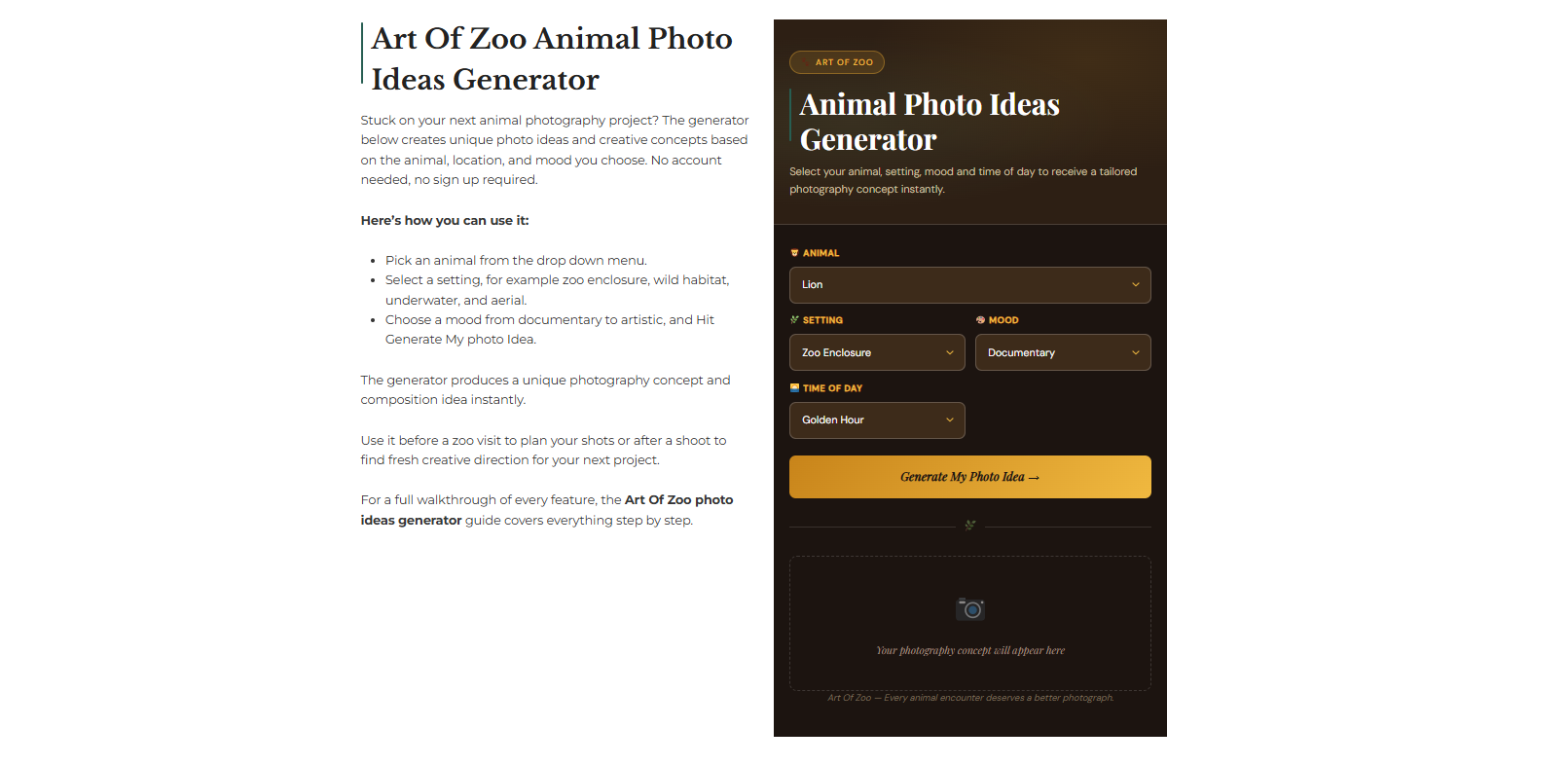
The table below shows what each output covers before you start using it.
| Output | What It Gives You |
| Photography Concept | A specific creative direction based on your animal and mood combination |
| Composition Tip | A practical framing and positioning suggestion specific to your chosen setting |
| Shot Idea | A light and exposure approach specific to your chosen time of day |
| Animal Behaviour to Watch For | A species specific signal that tells you when a decisive moment is approaching |
No account is required. No personal information is needed. Open the Art Of Zoo homepage, make your selections, and generate your idea instantly.
Step 1 — Choose Your Animal

The first input is the animal you want to photograph. The generator covers 20 species drawn from every major zoogeographic region, from the Palearctic Iberian lynx to the Neotropical three-toed sloth, from the Ethiopian mountain gorilla to the Nearctic polar bear.
Each species has its own dedicated behavioural data built into the generator, meaning a lion produces entirely different behaviour notes from a meerkat, and a humpback whale produces entirely different composition tips from a flamingo. The species reflect the animals that dominate wildlife photography competitions, zoo visitor activity, and conservation campaigns globally.
The species available are as follows:
- Lion, elephant, giraffe, leopard, polar bear, Bengal tiger, flamingo, snow leopard, mountain gorilla, Iberian lynx, humpback whale, red fox, eagle, penguin, cheetah, wolf, owl, sloth, pangolin, meerkat
Choose the species you are planning to photograph or the species you are most interested in learning about before a shoot. The generator works equally well for pre-shoot planning and for post-shoot creative exploration.
Step 2 — Choose Your Setting

The setting input tells the generator where you will be photographing the animal. Six settings are available, each producing a distinct set of composition tips oriented toward the specific constraints and opportunities of that environment.
The table below covers what each setting produces before you choose.
| Setting | What It Covers |
| Zoo Enclosure | Barrier and glass management, artificial light handling, enclosure positioning |
| Wild Habitat | Field positioning, downwind approach, natural background selection |
| Safari | Vehicle based photography, beanbag mounting, guide coordination |
| Underwater | Water column management, strobe positioning, upward angle technique |
| Aerial | Drone and aircraft positioning, pattern recognition from above, shadow use |
| Wildlife Sanctuary | Habituation awareness, keeper coordination, rehabilitation context |
Match the setting to where your shoot will actually take place. A zoo visit calls for Zoo Enclosure. A trip to the Ethiopian zoogeographic region in Africa calls for Safari. Work with a rehabilitation centre calls for a Wildlife Sanctuary. The more accurately the setting reflects your real shooting environment, the more practically useful the composition tip will be when you arrive.
Step 3 — Choose Your Mood

The mood input determines the creative direction of the photography concept the generator produces. Six moods are available, each producing a completely different concept for the same animal and setting combination.
The table below maps what each mood produces before you select.
| Mood | What It Produces |
| Documentary | Factual, behaviour focused concepts oriented toward natural history storytelling |
| Artistic | Abstract, form focused concepts oriented toward visual art rather than documentation |
| Conservation | Issue oriented concepts connecting the animal to its conservation status and threats |
| Playful | Behaviour focused concepts oriented toward joyful, energetic animal moments |
| Dramatic | High contrast, powerful concepts oriented toward impact and tension |
| Intimate Portrait | Close, quiet concepts oriented toward connection and emotional resonance |
The mood selection is where the most creative variation in the generator lives. A Bengal tiger in a safari setting on a dramatic mood produces a completely different concept from a Bengal tiger in a safari setting in an intimate portrait mood. Running the same animal and setting combination through multiple moods gives you a diverse set of directions for a single shoot location.
Step 4 — Choose Your Time of Day

The time of day input determines the shot idea the generator produces. Five options are available, each reflecting the specific light conditions and photographic opportunities of that period.
The table below covers what each time of day produces for your shot idea.
| Time of Day | What the Light Does |
| Golden Hour | Warm directional light, rim lighting on fur and feathers, long shadows |
| Blue Hour | Cool even light, soft shadow detail, atmospheric mood |
| Midday | Harsh overhead light, strong contrast, best for underwater clarity |
| Overcast | Flat even light, full shadow detail, ideal for dark coated species |
| Night | Low ambient light, nocturnal behaviour, camera trap and high ISO techniques |
Match your time of day selection to when you are actually planning to shoot. A morning zoo visit calls for Golden Hour. A nocturnal enclosure visit calls for Night. Overcast winter conditions call for Overcast. The shot idea the generator produces will be calibrated to those specific light conditions rather than a generic exposure recommendation.
Step 5 — Generate Your Idea

Click the Generate My Photo Idea button. The generator processes your four inputs and produces the complete output instantly. On the desktop the result appears in the preview panel on the right side of the tool. On mobile it appears below the input form.
Each of the four output sections appears in its own clearly labelled block. Read through all four before deciding how to use the idea. The photography concept and the animal behaviour note are the two outputs that reward the most careful reading because both describe specific moments and conditions that require preparation before the shoot rather than reaction during it.
Step 6 — Use the Output Effectively

The four outputs serve different purposes in a photography workflow and each is worth understanding separately before a shoot.
Photography Concept
Use this before the shoot to set your creative intention. The concept tells you what the image should feel like and what story it should tell. Reading it before you leave for the zoo or the field gives you a mental target that shapes every positioning and timing decision when you arrive.
Composition Tip
Use this to decide where to stand, how to position the lens relative to barriers or vegetation, and what background elements to look for. Composition tips are setting specific, meaning a zoo enclosure tip covers glass management and artificial light handling rather than open field positioning.
Shot Idea
Use this to configure your camera before the animal appears. The shot idea covers light handling for your chosen time of day, including specific exposure compensation approaches for backlit subjects, ISO recommendations for low light conditions, and shutter speed starting points for the ambient conditions you will be working in.
Animal Behaviour to Watch For
This is the most practically valuable output for decisive moment photography. Each behaviour note describes a specific pre-action signal that indicates a significant animal behaviour is about to happen. Fro example:
- The lion’s tail flick before it rises into action.
- The flamingo’s wings spread before revealing its brilliant red and black flight feathers.
- The meerkat sentinel’s freeze before the group scatters.
- The elephant’s ears flap before a charge.
- The cheetah’s head tilt before it takes off in a sprint.
- The gorilla’s eye contact before it approaches a potential threat.
Reading this output and memorizing the signals before your shoot gives you a preparation window that photographers who simply react to what happens never have.
Step 7 — Copy or Generate a New Idea
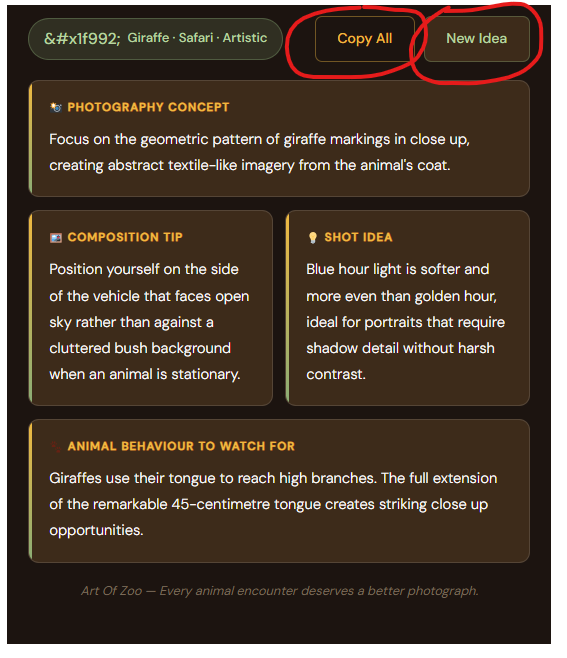
There are two action buttons that appear below the output are:
Copy Idea
Copies the complete output to your clipboard in a single click. The copied text includes the animal, setting, and mood badge alongside all four output sections. Paste it into your notes app, a planning document, or a message to a photography partner before the shoot.
New Idea
Generates a fresh set of outputs for the same inputs. Because the generator draws from multiple variations for each combination, clicking New Idea produces a different photography concept, composition tip, shot idea, and behaviour note from the same four inputs. Use this to build two or three creative directions for the same planned shoot rather than committing to a single approach.
Are you concerned about security? checkout our safety guide.
Getting the Most From the Art Of Zoo Generator
Run the same animal through every mood: Six mood selections for the same animal and setting produces six completely different creative directions. For a full day zoo visit with one primary species in mind, running through all six moods before you go gives you a complete creative toolkit covering documentary, artistic, conservation, playful, dramatic, and intimate approaches in the same location.
Use it after a shoot as well as before: The Art Of Zoo generator works as a reflection tool after a shoot as well as a planning tool before one. If you came away with images you are not satisfied with, run the species and setting combination through several mood variations to identify the creative direction you were missing. Use the behaviour note to understand what signals you may not have been watching for.
Match the mood to the species conservation status: For species with urgent conservation stories including the Iberian lynx, snow leopard, mountain gorilla, pangolin, and polar bear, the conservation mood produces concepts specifically oriented toward telling that story through the image. If your photography has any conservation intention the conservation mood consistently produces the most purposeful direction.
Combine outputs from multiple runs: The composition tip from one run and the behaviour note from another can be combined into a single shooting approach. The generator does not require you to use all four outputs from the same run. Mix and match across multiple runs to build a composite approach that fits your specific location and conditions.
Use it to learn species behaviour before visiting a zoo: Beyond photography planning, the Art Of Zoo generator is a practical species education tool. The behaviour notes for each animal describe the real pre-action signals that field photographers study for months. Reading through several runs for the same species before a zoo visit builds the behavioural familiarity that transforms passive zoo observation into active photography preparation.